What makes this file tricky
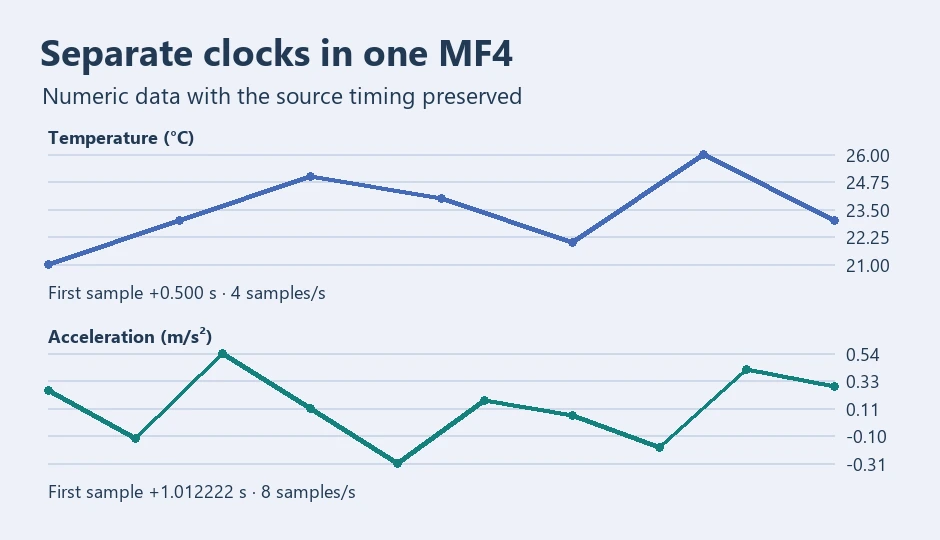
Channels in the same TDMS recorder can start at different times and run at different rates. Waveform Bridge writes a time axis for each channel.
Move LabVIEW TDMS waveform measurements into MDF 4.10 with each supported channel’s samples and timing.
Free preview US$12 per waveform export
Files stay on your device. No account needed.
TDMSInput format
MF4Output format
Local processingFiles stay in your browser
Channels in the same TDMS recorder can start at different times and run at different rates. Waveform Bridge writes a time axis for each channel.
Up to 128 MB per input. Supports explicitly timed fixed-width waveform channels. Raw DAQmx layouts and mixtures of absolute and relative clocks are outside the supported scope.
Open a TDMS file with numeric or Boolean waveform channels and explicit sampling intervals.
Review each channel’s rate, sample count and timing in the preview.
Save the MF4 and open it in an MDF 4 reader to check values and clocks.
Try a sample or open your own files. The preview runs in this browser.
Choose a file or try the sample to see the result here.
An independent MDF reader reopened the sample with channels at 4 Hz and 8 Hz and preserved their 17 values and UTC anchor.
| Tool | What it does |
|---|---|
| Waveform Bridge | An independent MDF reader reopened the sample with channels at 4 Hz and 8 Hz and preserved their 17 values and UTC anchor. |
| NI DIAdem | NI documents a scripted waveform-to-MDF4 export workflow. |
| npTDMS | Read TDMS with a Python library and build a conversion workflow. |
The links describe each alternative's documented workflow.
$0
Open a sample or your own files and inspect the result before deciding whether to export.
US$12 per waveform export
Pay once to download the full result shown in your preview.
Already paid? Restore your purchase.
Each supported channel keeps its sample order, rate and time axis.
Export DAQmx acquisitions from your source application as scaled waveform channels before converting.
The export is MDF 4.10, with a master time channel per signal.
The tool can preserve supported relative timing when the waveform metadata supplies a sampling interval.
The preview is free. Each waveform export is US$12, charged once at download.
Your files are processed in your browser. Stripe handles checkout separately.
No account is needed. Complete Stripe Checkout and return to this browser to download the result.
Open this tool in the same browser and select Restore purchase. Prepared exports are kept locally for up to seven days.
Follow the workflow and check the formats the tool supports.
See what stays in the browser and what Stripe receives at checkout.
Find out how to recover a purchase and which details to keep.
Open the tool and preview the result for free.